A custom verification CRM that turned scattered alumni spreadsheets into one fast platform, followed by a set of small web apps that took university offices off shared Excel files and paper.
The Holy Spirit University of Kaslik (USEK) is one of Lebanon's oldest private universities. Its advancement office is responsible for staying connected to thousands of graduates spread across the world — the foundation of every alumni event, fundraising drive, and engagement campaign a university runs.
// The problem
The contact data existed — but it lived everywhere. Old registration exports, event sign-in sheets, separate spreadsheets owned by different people. No single source of truth, no way to tell which records were current, and no shared view: whoever held the latest file held the data. Verifying and cleaning thousands of records across a team, on different devices, was effectively impossible.
// What I built
A custom CRM built around one job: verify and maintain the alumni contact list, fast, from anywhere. Every record lives in a single Cloudflare-backed database with instant cross-device sync — open it on a laptop, phone, or tablet and everyone sees the same live data.
alumni-crm · internal tool
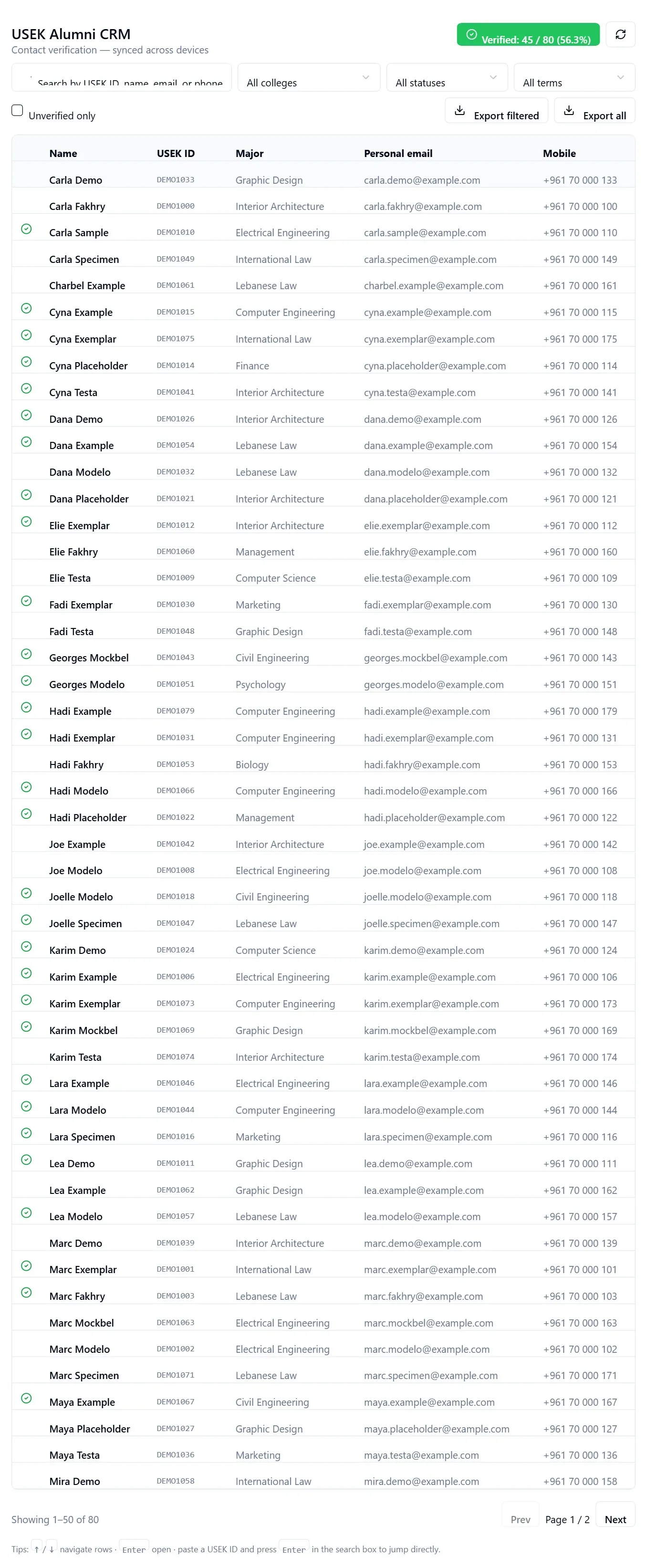
Search, filter by faculty / status / term, and verify in one view
One searchable list of every alumni record, filterable by faculty, graduation term, and status
One-tap verification with a live progress counter across the whole dataset
Instant cross-device sync — the team works from laptop, phone, or tablet on the same data
Alumni-card request tracking built into each record
Filtered or full CSV export, so the data stays portable and the office keeps ownership
alumni-crm · record detail
Each record: identity, contact, verification state, and card requests
A note on the data
Every screenshot on this page uses synthetic demo data — fictional names, emails, and numbers generated only for this case study. Real alumni records are never shown. Handling institutional data carefully, even in my own portfolio, is part of the job.
// Delivered result
The advancement office moved from a tangle of spreadsheets to a single system they control. Records can be verified and cleaned by the whole team in parallel, from any device, with a clear live view of how much of the dataset is confirmed. The cleaned data exports straight back out — ready for the events, outreach, and campaigns the alumni programme depends on.
Measurement note: the source dataset contained 1,750 rows. Time saved, verification throughput, error reduction, and campaign impact are not measured or published here.
Part two · Office workflows
From shared spreadsheets to small web apps
After the CRM, the same pattern kept showing up in other offices: a process run on a shared Excel file, a paper sheet or a chat thread, where nobody could see the whole picture and every report was rebuilt by hand. Each tool below replaces one of those, and each is deliberately small and does one job.
Staff leave scheduler
Live
Replaced: no single view of who is off
Staff log vacations and half-days from one page. The office admin approves them and sees at a glance who is out on any given day.
Optional approval step: new entries stay pending until the admin approves
Admin area behind a PIN with lockout after repeated failed attempts
Replaced: three shared Excel workbooks, one sheet per unit
Students in on-campus jobs earn a tuition discount per approved hour. Supervisors across 33 units used to fill in shared workbooks where each unit could see every other unit's sheet. The tracker gives each supervisor a permanent personal page with Check in / Check out per student, timed by the server clock, and a one-tap weekly approval.
Student Affairs sees every unit on one dashboard, including who hasn't submitted yet, and exports the discount report to Excel
Job board: units post openings, Student Affairs approves them, units pick applicants, and the job only exists once the signed NDA is on file
Two intake forms went live first, an office survey and a unit request form, each with an Excel/CSV export
Built to be handed over: one codebase runs on Cloudflare for the pilot and on Node + Postgres in Docker on the university's own servers
An inventory and lending desk for sports equipment. Staff scan an item out to a borrower and back in, see what is still out, and print a restock list.
Runs on the campus network with no external services
Scan an item, enter a quantity, and see "N of M still out" per item
Staff instruction book and security notes; the hardware check with the real scanner and label printer is still to come
Django · SQLite · local JavaScript/CSS
Court booking
Prototype
Replaced: manual booking of the multi-use court
A clickable, installable prototype showing students booking free slots on the court and the table-tennis room, with a coordinator view. It was built to walk through the flow with the department before anything goes further.
Works as an installable phone app (PWA)
Printed one-pager in English and French, with a QR code to the demo
Static PWA · HTML/CSS/JS
These are internal tools, so they are described here rather than linked. Status labels are as of September 2026. No usage or time-saved figures are published.
Is your team running a process on a shared spreadsheet?
I build CRMs and small internal tools for businesses in Lebanon and the Gulf: one job per tool, usable from any device, and your data exports whenever you want it.